
How it works
See the sound. Here's how.
Our patented Surround Vision Technology™ reads your game's surround audio and turns direction into light. Watch Dom Barwood, a Deaf gamer, break down Audio Radar 2.0: what it does, how it compares to the original, and how setup works at a high level. Then find your exact hookup below.

The walkthrough
Dom breaks down Audio Radar 2.0.
Signed throughout, with captions and voiceover.
How Audio Radar works
Your game already tells you where everything is, through sound. Audio Radar reads that sound and turns it into directional light around your screen, in real time: a footstep on your left becomes light on your left. You don't need to hear it. You'll see it.
Here's the whole thing in three steps, then the deeper technical story for whoever wants it.

The surround field
Seven channels, seven directions.
A 7.1 game sends sound to seven positions around you. Audio Radar gives each one a place on your screen, so direction arrives as light instead of something you have to pick out by ear.
Hook it up
Every setup, mapped.
Five configurations. Find yours. Audio Radar 2.0 first, then the original everywhere it plays.
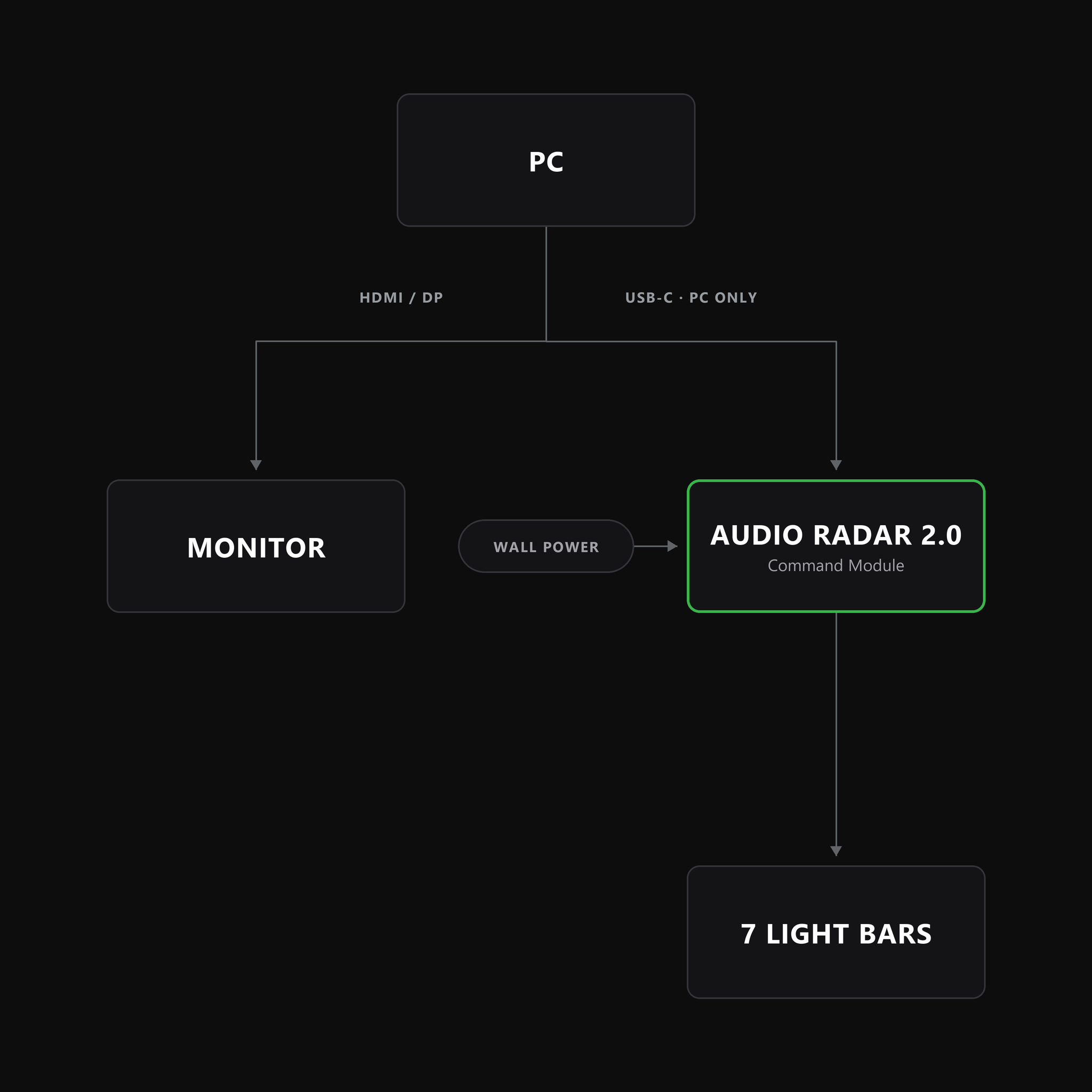
PC · USB-C
Audio Radar 2.0 + PC.
USB-C data to your PC, USB-C power to the wall, and both cables are in the box. Your GPU plugs straight into your monitor.
Notes: run the desktop app and the guided setup does the rest · Windows 10 or 11, 64-bit.
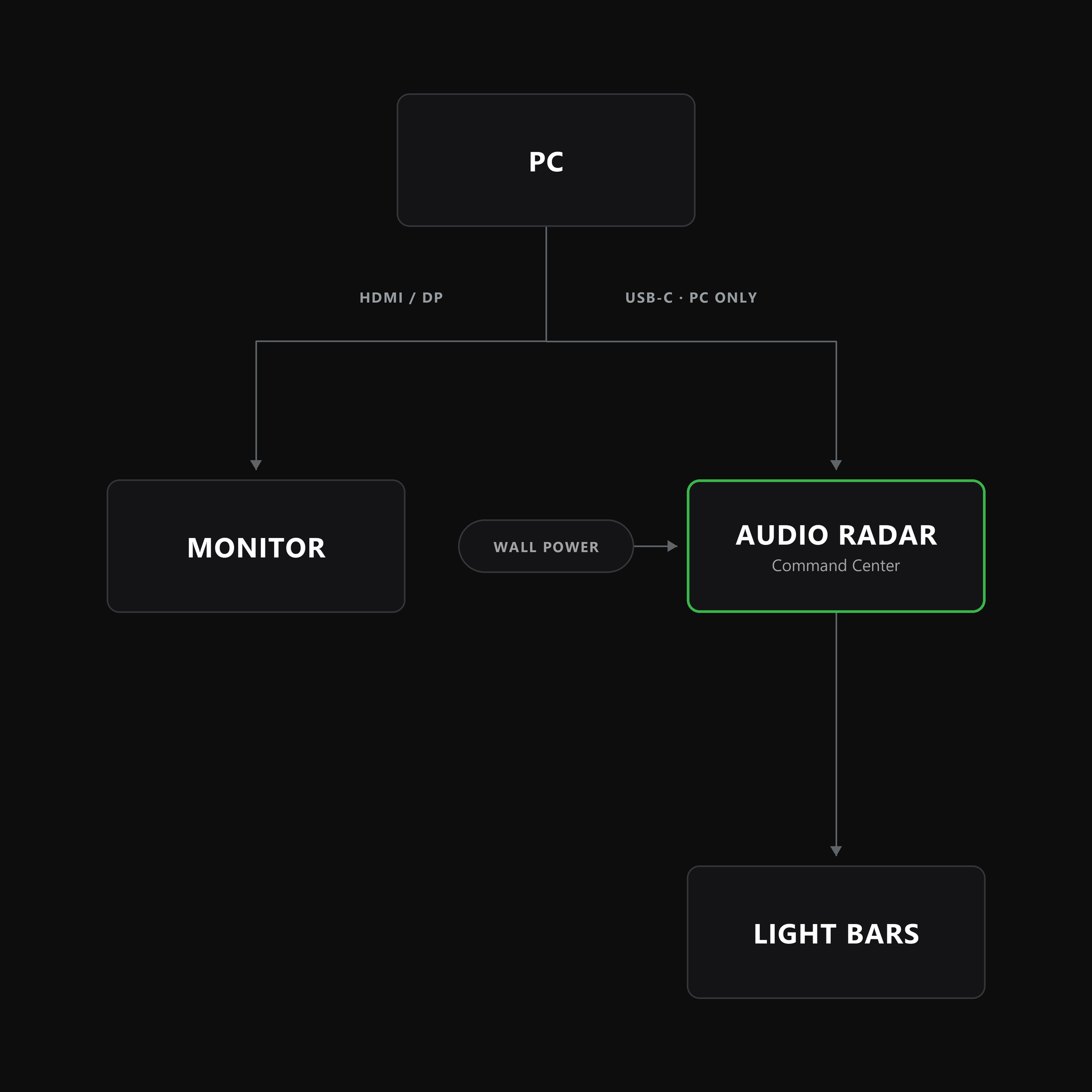
PC · USB-C data
Audio Radar + PC.
USB-C from the Command Center to your PC, data only. The Command Center stays on wall power, and your GPU plugs straight into your monitor.
Notes: one-time firmware update first: v1.3.2, free, via the mobile app over Bluetooth · leave HDMI out of it: the desktop app replaces the HDMI hookup · no Voicemeeter.
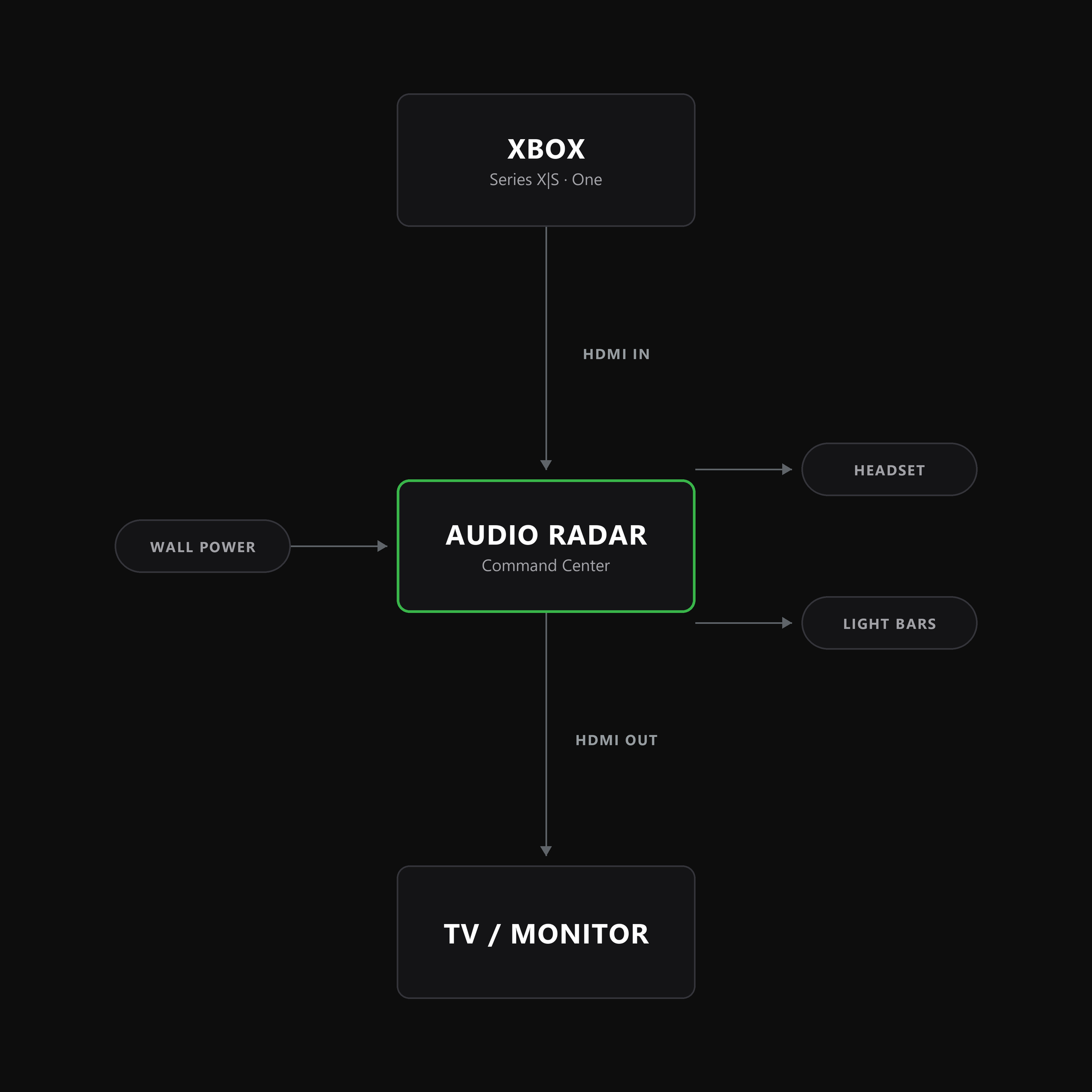
Console · HDMI
Audio Radar + Xbox.
Xbox → Command Center → your TV. HDMI in, HDMI out. Video passes straight through, and the bars react with no PC and no app.
Notes: your headset plugs into the Command Center's front jack · cable order matters: straight cable to the bottom-left bar first, then clockwise.
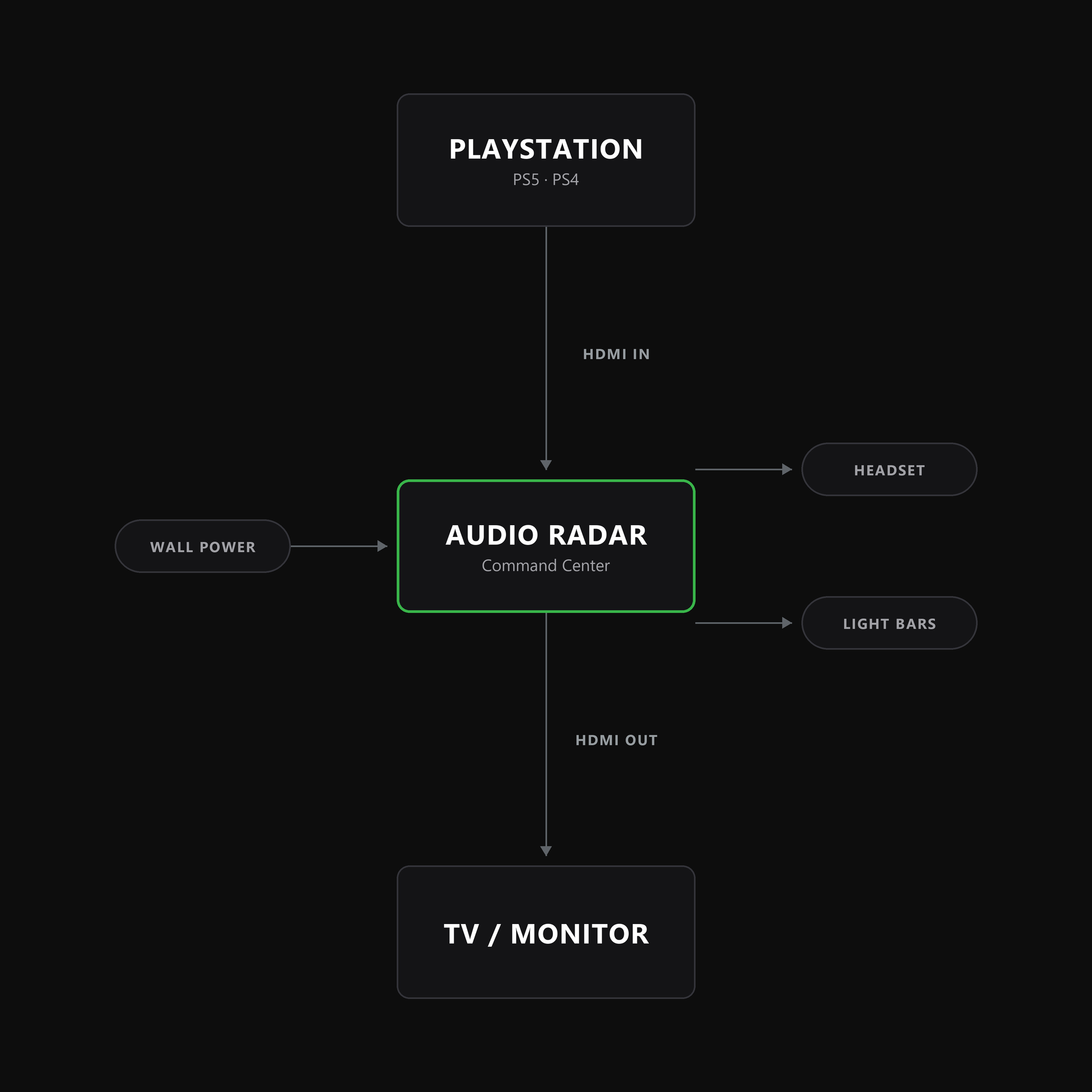
Console · HDMI
Audio Radar + PlayStation.
Same chain: PS5 or PS4 → Command Center → your TV, video straight through.
Notes: using a headset? Set Output to Headphones → “Voice Chat Only”: chat in your ears, game audio to the bars.
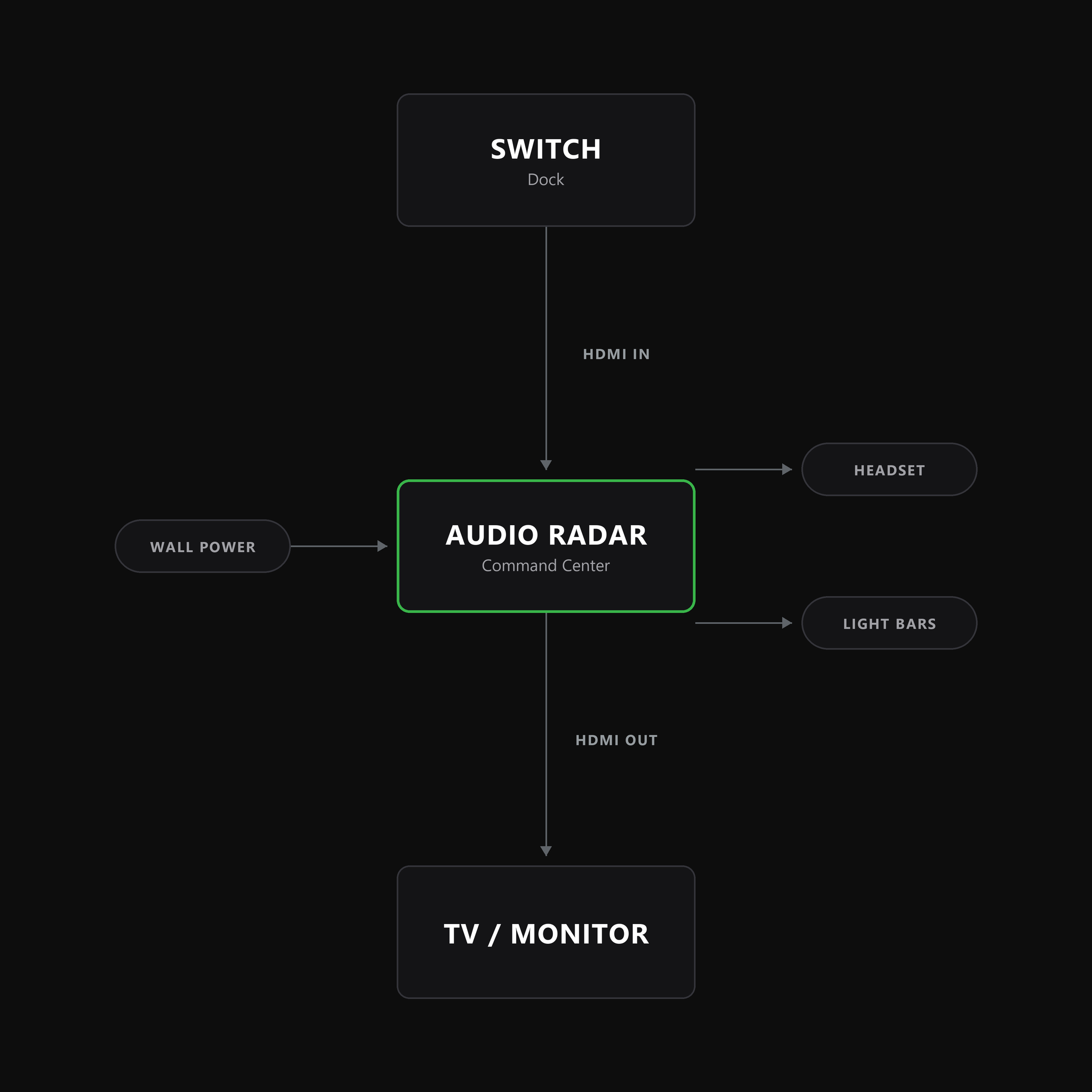
Console · HDMI
Audio Radar + Switch.
Dock → Command Center → your TV. Same HDMI path, nothing extra to configure.
Notes: Switch plays docked, and the bars ring your TV.
Performance
Will it lag my game? Slow my PC?
The questions gamers actually ask, answered straight.
On console: Audio Radar
On PC: both systems, via the app
Passes straight through the Command Center, video untouched
We're not in it: your GPU plugs straight into your monitor
Your game is untouched: the light is added information, not an overlay
No overlay, no game hooks, nothing in the render path, so frame rate is unaffected
Real time: the bars react as the sound happens, processed in hardware
Real time: the bars react as the sound happens
Zero. There's no PC involved
A light audio workload on the CPU, and the app idles when minimized to the tray
None to worry about: your console sees an audio device
None. Your PC sees an audio device. No game files, no memory access.
Old guides, retired
You don't need Voicemeeter. Not anymore.
For years, using the original Audio Radar with a PC headset meant a ten-step Voicemeeter setup. That era is over. The desktop app ships our own Microsoft-signed audio driver and a built-in per-app router: game audio to the bars and your headset at the same time, nothing third-party.
If you find an old guide recommending Voicemeeter (even one of ours) it's out of date. Get the desktop app ›
Will anti-cheat systems flag it?
Audio Radar never touches your game. On console, it works from your console's HDMI audio signal. On PC, the app reads your computer's audio output through its own Windows audio device: no game files, no memory access, no overlays, no game hooks. Your PC sees it just like an audio device. The lights are external hardware; nothing is drawn on your screen, so no FPS impact and no screen clutter.
Ready to see it for yourself?
See the Sound.™
Audio Radar 2.0 for PC, or Audio Radar for console and PC. 30-day returns: decide in your own setup.
Meet Audio Radar 2.0